
runtime
Self-healing runtime
- Runtime crashes restart automatically.
- Idle sessions hibernate and wake on the next message.
- Hung runs stop cleanly instead of staying stuck.
Preview
Durable Agent Sessions
OpenComputer handles session state, runtime lifecycle, streaming, and webhooks, so your app code stays small enough to run on an edge worker.
Example: PR-review agent repo
runtime
sandbox
stream
seq without gaps.webhook
Create an agent, start a session, then stream the event log and steer follow-up work.
An agent stores name, runtime, model, prompt, and model credential.
import { OpenComputer } from "@opencomputer/sdk";

const oc = new OpenComputer({
  apiKey: process.env.OPENCOMPUTER_API_KEY,
});

const agent = await oc.agents.create({
  name: "quickstart-coder",
  runtime: "claude",
  model: "anthropic/claude-opus-4-8",
  prompt: "Work in /workspace. Say progress. Ask only when blocked.",
  key: process.env.ANTHROPIC_API_KEY,
  limits: { turns: 4, turnSeconds: 600 },
});
A session
starts work and returns a browser-safe
client_token
scoped to that session.
const session = await oc.sessions.create({
  agent: agent.id,
  input: "Create a todo app with local storage.",
  metadata: {
    projectId: "proj_123",
    taskId: "task_456",
  },
  idempotencyKey: "task_456",
  destinations: [{
    url: "https://your.app/oc-webhook",
    level: "user",
    types: ["turn.completed"],
  }],
});

// session.id + session.clientToken
Use the session token in the browser.
EventSource
resumes after dropped connections.
import { connectSession } from "@opencomputer/sdk";

const live = await connectSession({ sessionId, clientToken });

for await (const event of live.events({ level: "progress" })) {
  render(event);
}

await live.steer("Add a completed-task filter.", {
  idempotencyKey: "msg_01",
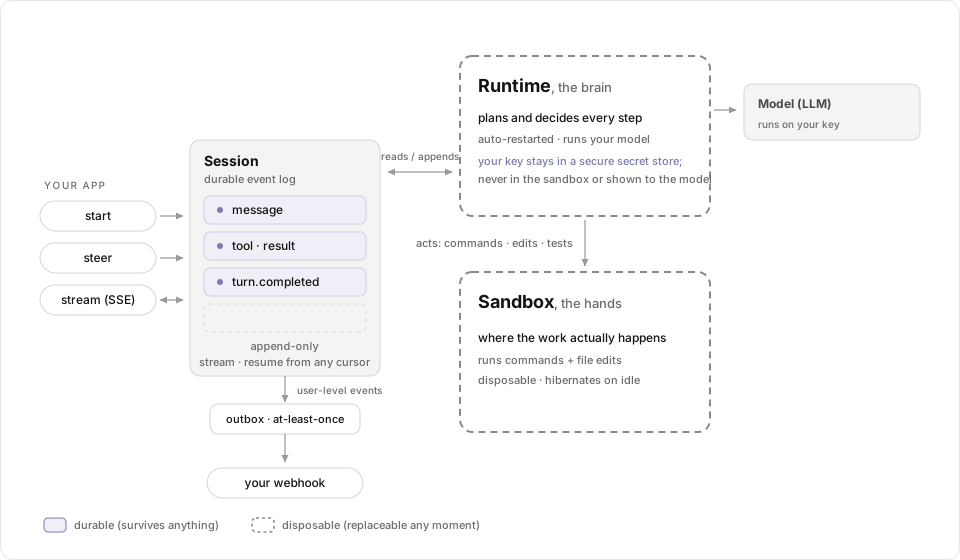
});A session is the durable unit of an agent at work: an append-only event log, pinned agent snapshot, and lifecycle status. Compute attaches, hibernates, and wakes on the next message.
| Status | Meaning |
|---|---|
queued | Scheduled; a turn has not started running yet. |
running | A turn is executing. |
awaiting_input | A turn ended asking a question. Reply by steering. |
idle | Done for now, quiescent and steerable. The sandbox is hibernated. |
failed | The session errored out. |
archived | Closed and read-only. |
const session = await oc.sessions.get("ses_...");
const { lastTurn, result } = await session.result();

// lastTurn.yieldReason: "completed", "needs_input",
// "deadline_exceeded", "budget_exceeded", "max_turns", "canceled"
Each session has ordered
events.
Use seq to resume and type to handle structured events.
turn.started
  tool.call          npm test
  exec.completed     exit 1
  agent.message      "3 tests fail"   level: user
turn.completed needs_input| Event field | Use it for |
|---|---|
type | Stable discriminator: agent.message, turn.completed, tool.call, exec.completed, errors. |
level | Visibility filter: user, progress, or internal. |
seq | Monotonic cursor for ordering and resume. |
body | Typed payload for that event. |
actor | Who produced the event: human, agent, or system. |
Register a
destination
and user-level events are delivered at least once and retried.
Deliveries are signed when the destination has a secret. The envelope includes the session
metadata
you set at create time.
{
  "type": "turn.completed",
  "sessionId": "ses_...",
  "eventId": "evt_...",
  "metadata": {
    "projectId": "proj_123",
    "taskId": "task_456"
  },
  "event": {
    "id": "evt_...",
    "seq": 12,
    "type": "turn.completed",
    "level": "user",
    "body": { "yield_reason": "completed" }
  }
}const session = await oc.sessions.get("ses_...");
await session.destinations.create({
url: "https://your.app/oc-webhook",
secret: "whsec_...",
level: "user",
types: ["turn.completed"],
});
Dedupe on webhook-id. Verify the raw body with a
Standard Webhooks
library when a destination secret is set. A
delivery
succeeds on any HTTP 2xx.
The PR-review agent
stores GitHub PR IDs in metadata. Completion webhooks carry them
back, so the app can update the PR without a database, queue, or always-on worker.
The claude and codex runtimes
use
tools
against the hands sandbox. The brain has no direct filesystem or shell;
commands and file edits run through the hands tools.
| Tool | What it does |
|---|---|
bash | Run a shell command in the sandbox. |
read | Read a file from the sandbox. |
write | Write a file to the sandbox. |
ls | List a directory in the sandbox. |
say | Emit a user-level message. The final say is the session result. |
ask | Ask a question and yield with needs_input. Reply by steering. |
For public repositories, put the repo URL and branch or commit in the task text. Prepared workspaces and private-repo access are coming soon.
Your app starts, streams, and steers a durable session. The managed runtime drives the agent loop, acts through the hands sandbox, and delivers user-level events to your webhook.
Docs explain the API. Repos show complete apps.